
Hinweis
Zum Ende springen, um den vollständigen Beispielcode herunterzuladen.
Pfadeditor#
Ereignisse GUI-übergreifend teilen.
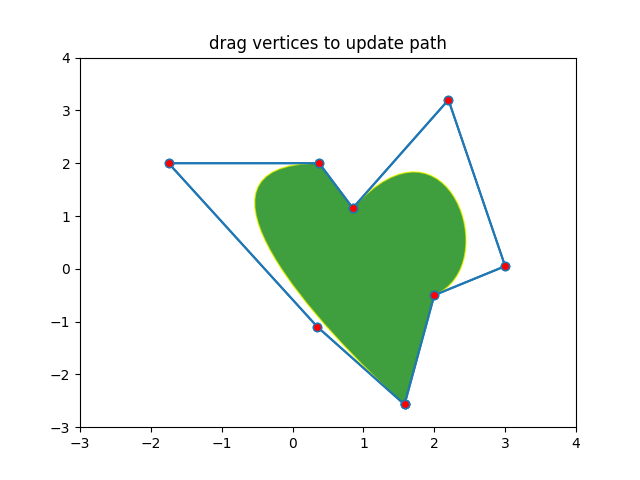
Dieses Beispiel demonstriert eine GUI-übergreifende Anwendung, die Matplotlib-Ereignisbehandlung nutzt, um mit Objekten auf der Leinwand zu interagieren und diese zu modifizieren.
Hinweis
Dieses Beispiel demonstriert die interaktiven Fähigkeiten von Matplotlib und wird nicht in der statischen Dokumentation angezeigt. Bitte führen Sie diesen Code auf Ihrem Computer aus, um die Interaktivität zu sehen.
Sie können einzelne Teile kopieren und einfügen oder das gesamte Beispiel über den Link am Ende der Seite herunterladen.
import matplotlib.pyplot as plt
import numpy as np

from matplotlib.backend_bases import MouseButton
from matplotlib.patches import PathPatch
from matplotlib.path import Path

fig, ax = plt.subplots()

pathdata = [
    (Path.MOVETO, (1.58, -2.57)),
    (Path.CURVE4, (0.35, -1.1)),
    (Path.CURVE4, (-1.75, 2.0)),
    (Path.CURVE4, (0.375, 2.0)),
    (Path.LINETO, (0.85, 1.15)),
    (Path.CURVE4, (2.2, 3.2)),
    (Path.CURVE4, (3, 0.05)),
    (Path.CURVE4, (2.0, -0.5)),
    (Path.CLOSEPOLY, (1.58, -2.57)),
]

codes, verts = zip(*pathdata)
path = Path(verts, codes)
patch = PathPatch(
    path, facecolor='green', edgecolor='yellow', alpha=0.5)
ax.add_patch(patch)


class PathInteractor:
    """
    A path editor.

    Press 't' to toggle vertex markers on and off.  When vertex markers are on,
    they can be dragged with the mouse.
    """

    showverts = True
    epsilon = 5  # max pixel distance to count as a vertex hit

    def __init__(self, pathpatch):

        self.ax = pathpatch.axes
        canvas = self.ax.figure.canvas
        self.pathpatch = pathpatch
        self.pathpatch.set_animated(True)

        x, y = zip(*self.pathpatch.get_path().vertices)

        self.line, = ax.plot(
            x, y, marker='o', markerfacecolor='r', animated=True)

        self._ind = None  # the active vertex

        canvas.mpl_connect('draw_event', self.on_draw)
        canvas.mpl_connect('button_press_event', self.on_button_press)
        canvas.mpl_connect('key_press_event', self.on_key_press)
        canvas.mpl_connect('button_release_event', self.on_button_release)
        canvas.mpl_connect('motion_notify_event', self.on_mouse_move)
        self.canvas = canvas

    def get_ind_under_point(self, event):
        """
        Return the index of the point closest to the event position or *None*
        if no point is within ``self.epsilon`` to the event position.
        """
        xy = self.pathpatch.get_path().vertices
        xyt = self.pathpatch.get_transform().transform(xy)  # to display coords
        xt, yt = xyt[:, 0], xyt[:, 1]
        d = np.sqrt((xt - event.x)**2 + (yt - event.y)**2)
        ind = d.argmin()
        return ind if d[ind] < self.epsilon else None

    def on_draw(self, event):
        """Callback for draws."""
        self.background = self.canvas.copy_from_bbox(self.ax.bbox)
        self.ax.draw_artist(self.pathpatch)
        self.ax.draw_artist(self.line)

    def on_button_press(self, event):
        """Callback for mouse button presses."""
        if (event.inaxes is None
                or event.button != MouseButton.LEFT
                or not self.showverts):
            return
        self._ind = self.get_ind_under_point(event)

    def on_button_release(self, event):
        """Callback for mouse button releases."""
        if (event.button != MouseButton.LEFT
                or not self.showverts):
            return
        self._ind = None

    def on_key_press(self, event):
        """Callback for key presses."""
        if not event.inaxes:
            return
        if event.key == 't':
            self.showverts = not self.showverts
            self.line.set_visible(self.showverts)
            if not self.showverts:
                self._ind = None
        self.canvas.draw()

    def on_mouse_move(self, event):
        """Callback for mouse movements."""
        if (self._ind is None
                or event.inaxes is None
                or event.button != MouseButton.LEFT
                or not self.showverts):
            return

        vertices = self.pathpatch.get_path().vertices

        vertices[self._ind] = event.xdata, event.ydata
        self.line.set_data(zip(*vertices))

        self.canvas.restore_region(self.background)
        self.ax.draw_artist(self.pathpatch)
        self.ax.draw_artist(self.line)
        self.canvas.blit(self.ax.bbox)


interactor = PathInteractor(patch)
ax.set_title('drag vertices to update path')
ax.set_xlim(-3, 4)
ax.set_ylim(-3, 4)

plt.show()