
Hinweis
Zum Ende springen, um den vollständigen Beispielcode herunterzuladen.
Automatische Textumrandung#
Matplotlib kann Text automatisch umbrechen, aber wenn er zu lang ist, wird der Text immer noch leicht außerhalb der Grenzen der Achse angezeigt.
Hinweis: Die automatische Umrandung funktioniert nicht zusammen mit savefig(..., bbox_inches='tight'). Die Einstellung 'tight' skaliert die Leinwand neu, um allen Inhalt unterzubringen, und erfolgt vor dem Umbruch. Dies wirkt sich auf %matplotlib inline in IPython und Jupyter Notebooks aus, wo die Inline-Einstellung standardmäßig bbox_inches='tight' verwendet, wenn das Bild zum Einbetten gespeichert wird.
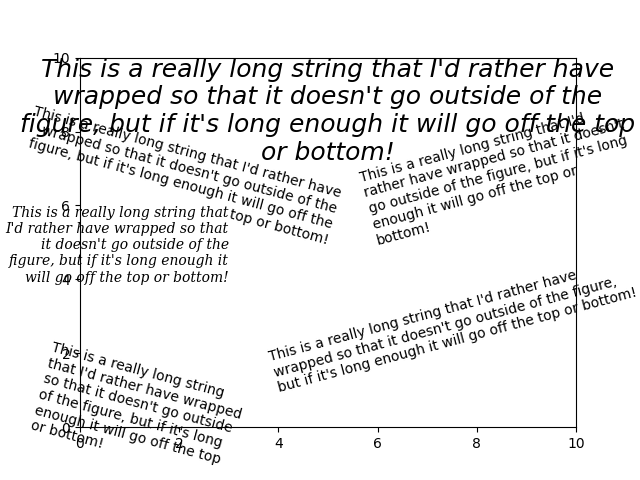
import matplotlib.pyplot as plt

fig = plt.figure()
plt.axis((0, 10, 0, 10))
t = ("This is a really long string that I'd rather have wrapped so that it "
     "doesn't go outside of the figure, but if it's long enough it will go "
     "off the top or bottom!")
plt.text(4, 1, t, ha='left', rotation=15, wrap=True)
plt.text(6, 5, t, ha='left', rotation=15, wrap=True)
plt.text(5, 5, t, ha='right', rotation=-15, wrap=True)
plt.text(5, 10, t, fontsize=18, style='oblique', ha='center',
         va='top', wrap=True)
plt.text(3, 4, t, family='serif', style='italic', ha='right', wrap=True)
plt.text(-1, 0, t, ha='left', rotation=-15, wrap=True)

plt.show()
Gesamtlaufzeit des Skripts: (0 Minuten 1,397 Sekunden)