
Hinweis
Gehen Sie zum Ende, um den vollständigen Beispielcode herunterzuladen.
Zeichnen von ausgefallenen Boxen#
Die folgenden Beispiele zeigen, wie man Boxen (FancyBboxPatch) mit verschiedenen visuellen Eigenschaften zeichnet.
import inspect

import matplotlib.pyplot as plt

import matplotlib.patches as mpatch
from matplotlib.patches import FancyBboxPatch
import matplotlib.transforms as mtransforms
Box-Stile#
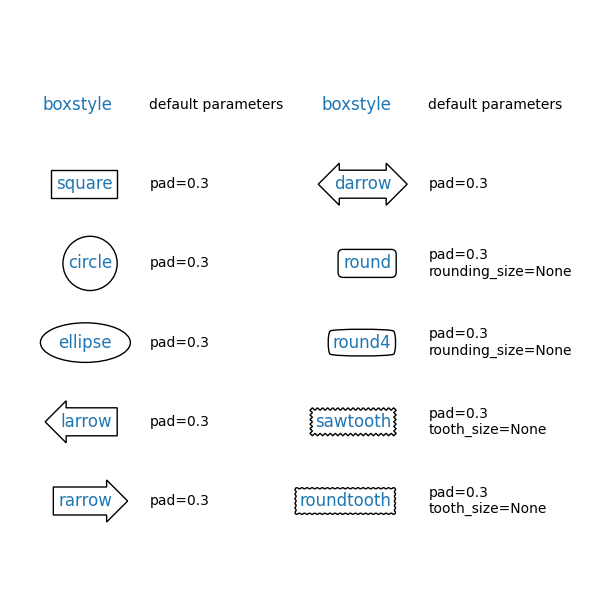
FancyBboxPatch unterstützt verschiedene BoxStyles. Beachten Sie, dass text das Zeichnen einer Box um Text durch Hinzufügen des Parameters bbox ermöglicht. Daher sehen Sie im folgenden Beispiel keine expliziten Aufrufe von FancyBboxPatch und BoxStyle.
styles = mpatch.BoxStyle.get_styles()
ncol = 2
nrow = (len(styles) + 1) // ncol
axs = (plt.figure(figsize=(3 * ncol, 1 + nrow))
       .add_gridspec(1 + nrow, ncol, wspace=.5).subplots())
for ax in axs.flat:
    ax.set_axis_off()
for ax in axs[0, :]:
    ax.text(.2, .5, "boxstyle",
            transform=ax.transAxes, size="large", color="tab:blue",
            horizontalalignment="right", verticalalignment="center")
    ax.text(.4, .5, "default parameters",
            transform=ax.transAxes,
            horizontalalignment="left", verticalalignment="center")
for ax, (stylename, stylecls) in zip(axs[1:, :].T.flat, styles.items()):
    ax.text(.2, .5, stylename, bbox=dict(boxstyle=stylename, fc="w", ec="k"),
            transform=ax.transAxes, size="large", color="tab:blue",
            horizontalalignment="right", verticalalignment="center")
    ax.text(.4, .5, str(inspect.signature(stylecls))[1:-1].replace(", ", "\n"),
            transform=ax.transAxes,
            horizontalalignment="left", verticalalignment="center")
Parameter zur Modifizierung der Box#
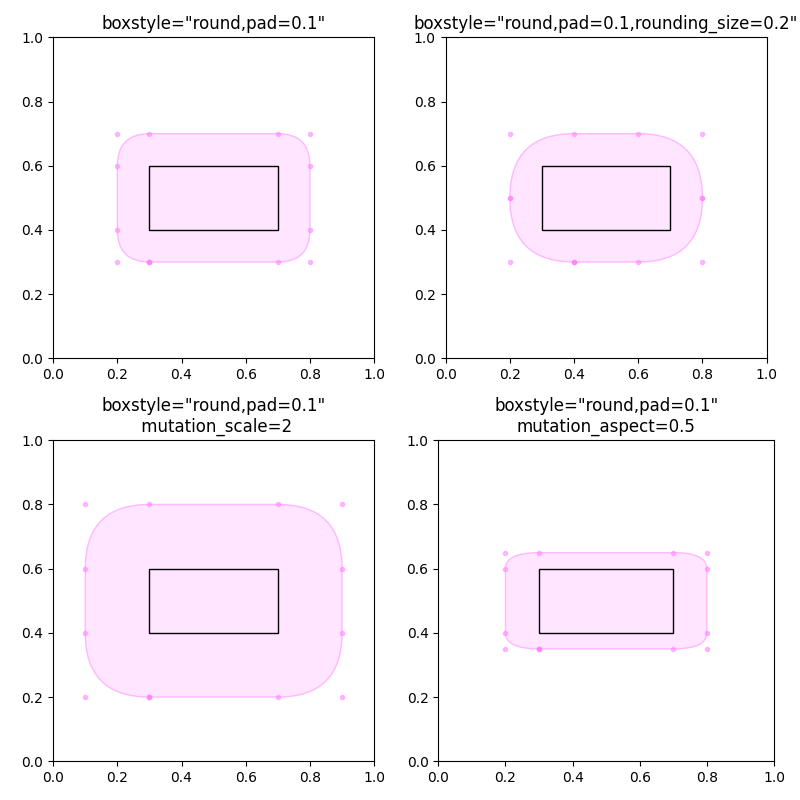
BoxStyles haben zusätzliche Parameter, um ihr Aussehen zu konfigurieren. Zum Beispiel können "runde" Boxen pad und rounding haben.
Zusätzlich skalieren die Parameter mutation_scale und mutation_aspect von FancyBboxPatch das Aussehen der Box.
def add_fancy_patch_around(ax, bb, **kwargs):
    kwargs = {
        'facecolor': (1, 0.8, 1, 0.5),
        'edgecolor': (1, 0.5, 1, 0.5),
        **kwargs
    }
    fancy = FancyBboxPatch(bb.p0, bb.width, bb.height, **kwargs)
    ax.add_patch(fancy)
    return fancy


def draw_control_points_for_patches(ax):
    for patch in ax.patches:
        patch.axes.plot(*patch.get_path().vertices.T, ".",
                        c=patch.get_edgecolor())


fig, axs = plt.subplots(2, 2, figsize=(8, 8))

# Bbox object around which the fancy box will be drawn.
bb = mtransforms.Bbox([[0.3, 0.4], [0.7, 0.6]])

ax = axs[0, 0]
# a fancy box with round corners. pad=0.1
add_fancy_patch_around(ax, bb, boxstyle="round,pad=0.1")
ax.set(xlim=(0, 1), ylim=(0, 1), aspect=1,
       title='boxstyle="round,pad=0.1"')

ax = axs[0, 1]
# bbox=round has two optional arguments: pad and rounding_size.
# They can be set during the initialization.
fancy = add_fancy_patch_around(ax, bb, boxstyle="round,pad=0.1")
# The boxstyle and its argument can be later modified with set_boxstyle().
# Note that the old attributes are simply forgotten even if the boxstyle name
# is same.
fancy.set_boxstyle("round,pad=0.1,rounding_size=0.2")
# or: fancy.set_boxstyle("round", pad=0.1, rounding_size=0.2)
ax.set(xlim=(0, 1), ylim=(0, 1), aspect=1,
       title='boxstyle="round,pad=0.1,rounding_size=0.2"')

ax = axs[1, 0]
# mutation_scale determines the overall scale of the mutation, i.e. both pad
# and rounding_size is scaled according to this value.
add_fancy_patch_around(ax, bb, boxstyle="round,pad=0.1", mutation_scale=2)
ax.set(xlim=(0, 1), ylim=(0, 1), aspect=1,
       title='boxstyle="round,pad=0.1"\n mutation_scale=2')

ax = axs[1, 1]
# mutation_aspect scales the vertical influence of the parameters (technically,
# it scales the height of the box down by mutation_aspect, applies the box parameters
# and scales the result back up). In effect, the vertical pad is scaled to
# pad * mutation_aspect, e.g. mutation_aspect=0.5 halves the vertical pad.
add_fancy_patch_around(ax, bb, boxstyle="round,pad=0.1", mutation_aspect=0.5)
ax.set(xlim=(0, 1), ylim=(0, 1),
       title='boxstyle="round,pad=0.1"\nmutation_aspect=0.5')

for ax in axs.flat:
    draw_control_points_for_patches(ax)
    # Draw the original bbox (using boxstyle=square with pad=0).
    add_fancy_patch_around(ax, bb, boxstyle="square,pad=0",
                           edgecolor="black", facecolor="none", zorder=10)

fig.tight_layout()


plt.show()
Erzeugung visuell konstanter Abstände auf Achsen mit ungleichem Seitenverhältnis#
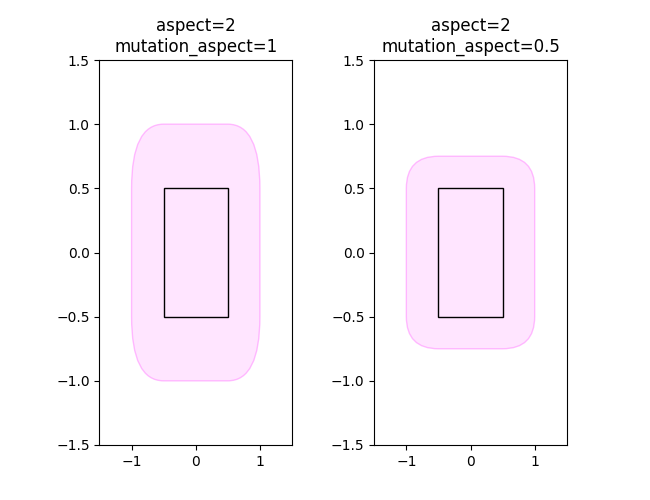
Da der Abstand in Box-Koordinaten, d.h. normalerweise Datenkoordinaten, gemessen wird, wird ein gegebener Abstand unterschiedlich groß dargestellt, wenn das Seitenverhältnis der Achsen nicht 1 ist. Um visuell gleiche horizontale und vertikale Abstände zu erhalten, setzen Sie mutation_aspect auf den Kehrwert des Achsen-Seitenverhältnisses. Dies skaliert den vertikalen Abstand entsprechend.
fig, (ax1, ax2) = plt.subplots(1, 2, figsize=(6.5, 5))

# original boxes
bb = mtransforms.Bbox([[-0.5, -0.5], [0.5, 0.5]])
add_fancy_patch_around(ax1, bb, boxstyle="square,pad=0",
                       edgecolor="black", facecolor="none", zorder=10)
add_fancy_patch_around(ax2, bb, boxstyle="square,pad=0",
                       edgecolor="black", facecolor="none", zorder=10)
ax1.set(xlim=(-1.5, 1.5), ylim=(-1.5, 1.5), aspect=2)
ax2.set(xlim=(-1.5, 1.5), ylim=(-1.5, 1.5), aspect=2)


fancy = add_fancy_patch_around(
    ax1, bb, boxstyle="round,pad=0.5")
ax1.set_title("aspect=2\nmutation_aspect=1")

fancy = add_fancy_patch_around(
    ax2, bb, boxstyle="round,pad=0.5", mutation_aspect=0.5)
ax2.set_title("aspect=2\nmutation_aspect=0.5")
Referenzen
Die Verwendung der folgenden Funktionen, Methoden, Klassen und Module wird in diesem Beispiel gezeigt
matplotlib.patches.BoxStyle.get_styles
Gesamtlaufzeit des Skripts: (0 Minuten 2,426 Sekunden)