
Hinweis
Zum Ende gehen, um den vollständigen Beispielcode herunterzuladen.
Verwenden eines Textes als Pfad#
TextPath erstellt einen Path, der der Umriss der Zeichen eines Textes ist. Der resultierende Pfad kann z. B. als Beschneidungspfad für ein Bild verwendet werden.
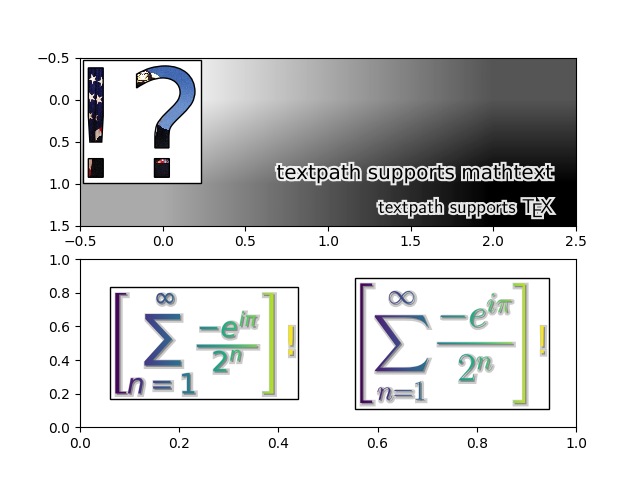
import matplotlib.pyplot as plt
import numpy as np

from matplotlib.cbook import get_sample_data
from matplotlib.image import BboxImage
from matplotlib.offsetbox import (AnchoredOffsetbox, AnnotationBbox,
                                  AuxTransformBox)
from matplotlib.patches import PathPatch, Shadow
from matplotlib.text import TextPath
from matplotlib.transforms import IdentityTransform


class PathClippedImagePatch(PathPatch):
    """
    The given image is used to draw the face of the patch. Internally,
    it uses BboxImage whose clippath set to the path of the patch.

    FIXME : The result is currently dpi dependent.
    """

    def __init__(self, path, bbox_image, **kwargs):
        super().__init__(path, **kwargs)
        self.bbox_image = BboxImage(
            self.get_window_extent, norm=None, origin=None)
        self.bbox_image.set_data(bbox_image)

    def set_facecolor(self, color):
        """Simply ignore facecolor."""
        super().set_facecolor("none")

    def draw(self, renderer=None):
        # the clip path must be updated every draw. any solution? -JJ
        self.bbox_image.set_clip_path(self._path, self.get_transform())
        self.bbox_image.draw(renderer)
        super().draw(renderer)


if __name__ == "__main__":

    fig, (ax1, ax2) = plt.subplots(2)

    # EXAMPLE 1

    arr = plt.imread(get_sample_data("grace_hopper.jpg"))

    text_path = TextPath((0, 0), "!?", size=150)
    p = PathClippedImagePatch(text_path, arr, ec="k")

    # make offset box
    offsetbox = AuxTransformBox(IdentityTransform())
    offsetbox.add_artist(p)

    # make anchored offset box
    ao = AnchoredOffsetbox(loc='upper left', child=offsetbox, frameon=True,
                           borderpad=0.2)
    ax1.add_artist(ao)

    # another text
    for usetex, ypos, string in [
            (False, 0.25, r"textpath supports mathtext"),
            (True, 0.05, r"textpath supports \TeX"),
    ]:
        text_path = TextPath((0, 0), string, size=20, usetex=usetex)

        p1 = PathPatch(text_path, ec="w", lw=3, fc="w", alpha=0.9)
        p2 = PathPatch(text_path, ec="none", fc="k")

        offsetbox2 = AuxTransformBox(IdentityTransform())
        offsetbox2.add_artist(p1)
        offsetbox2.add_artist(p2)

        ab = AnnotationBbox(offsetbox2, (0.95, ypos),
                            xycoords='axes fraction',
                            boxcoords="offset points",
                            box_alignment=(1., 0.),
                            frameon=False,
                            )
        ax1.add_artist(ab)

    ax1.imshow([[0, 1, 2], [1, 2, 3]], cmap=plt.cm.gist_gray_r,
               interpolation="bilinear", aspect="auto")

    # EXAMPLE 2

    arr = np.arange(256).reshape(1, 256)

    for usetex, xpos, string in [
            (False, 0.25,
             r"$\left[\sum_{n=1}^\infty\frac{-e^{i\pi}}{2^n}\right]$!"),
            (True, 0.75,
             r"$\displaystyle\left[\sum_{n=1}^\infty"
             r"\frac{-e^{i\pi}}{2^n}\right]$!"),
    ]:
        text_path = TextPath((0, 0), string, size=40, usetex=usetex)
        text_patch = PathClippedImagePatch(text_path, arr, ec="none")
        shadow1 = Shadow(text_patch, 1, -1, fc="none", ec="0.6", lw=3)
        shadow2 = Shadow(text_patch, 1, -1, fc="0.3", ec="none")

        # make offset box
        offsetbox = AuxTransformBox(IdentityTransform())
        offsetbox.add_artist(shadow1)
        offsetbox.add_artist(shadow2)
        offsetbox.add_artist(text_patch)

        # place the anchored offset box using AnnotationBbox
        ab = AnnotationBbox(offsetbox, (xpos, 0.5), box_alignment=(0.5, 0.5))

        ax2.add_artist(ab)

    ax2.set_xlim(0, 1)
    ax2.set_ylim(0, 1)

    plt.show()
Gesamtlaufzeit des Skripts: (0 Minuten 4,720 Sekunden)