
Hinweis
Gehen Sie zum Ende, um den vollständigen Beispielcode herunterzuladen.
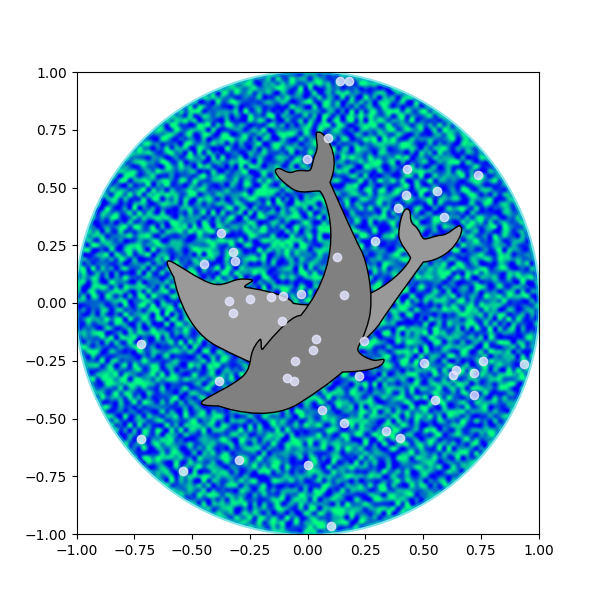
Delfine#
Dieses Beispiel zeigt, wie Formen anhand von Scheitelpunkten und Knoten mithilfe der Klassen Path, PathPatch und transforms gezeichnet und manipuliert werden können.
import matplotlib.pyplot as plt
import numpy as np

import matplotlib.cm as cm
from matplotlib.patches import Circle, PathPatch
from matplotlib.path import Path
from matplotlib.transforms import Affine2D

# Fixing random state for reproducibility
np.random.seed(19680801)


r = np.random.rand(50)
t = np.random.rand(50) * np.pi * 2.0
x = r * np.cos(t)
y = r * np.sin(t)

fig, ax = plt.subplots(figsize=(6, 6))
circle = Circle((0, 0), 1, facecolor='none',
                edgecolor=(0, 0.8, 0.8), linewidth=3, alpha=0.5)
ax.add_patch(circle)

im = plt.imshow(np.random.random((100, 100)),
                origin='lower', cmap=cm.winter,
                interpolation='spline36',
                extent=(-1, 1, -1, 1))
im.set_clip_path(circle)

plt.plot(x, y, 'o', color=(0.9, 0.9, 1.0), alpha=0.8)

# Dolphin from OpenClipart library by Andy Fitzsimon
#   <cc:License rdf:about="http://web.resource.org/cc/PublicDomain">
#     <cc:permits rdf:resource="http://web.resource.org/cc/Reproduction"/>
#     <cc:permits rdf:resource="http://web.resource.org/cc/Distribution"/>
#     <cc:permits rdf:resource="http://web.resource.org/cc/DerivativeWorks"/>
#   </cc:License>

dolphin = """
M -0.59739425,160.18173 C -0.62740401,160.18885 -0.57867129,160.11183
-0.57867129,160.11183 C -0.57867129,160.11183 -0.5438361,159.89315
-0.39514638,159.81496 C -0.24645668,159.73678 -0.18316813,159.71981
-0.18316813,159.71981 C -0.18316813,159.71981 -0.10322971,159.58124
-0.057804323,159.58725 C -0.029723983,159.58913 -0.061841603,159.60356
-0.071265813,159.62815 C -0.080250183,159.65325 -0.082918513,159.70554
-0.061841203,159.71248 C -0.040763903,159.7194 -0.0066711426,159.71091
0.077336307,159.73612 C 0.16879567,159.76377 0.28380306,159.86448
0.31516668,159.91533 C 0.3465303,159.96618 0.5011127,160.1771
0.5011127,160.1771 C 0.63668998,160.19238 0.67763022,160.31259
0.66556395,160.32668 C 0.65339985,160.34212 0.66350443,160.33642
0.64907098,160.33088 C 0.63463742,160.32533 0.61309688,160.297
0.5789627,160.29339 C 0.54348657,160.28968 0.52329693,160.27674
0.50728856,160.27737 C 0.49060916,160.27795 0.48965803,160.31565
0.46114204,160.33673 C 0.43329696,160.35786 0.4570711,160.39871
0.43309565,160.40685 C 0.4105108,160.41442 0.39416631,160.33027
0.3954995,160.2935 C 0.39683269,160.25672 0.43807996,160.21522
0.44567915,160.19734 C 0.45327833,160.17946 0.27946869,159.9424
-0.061852613,159.99845 C -0.083965233,160.0427 -0.26176109,160.06683
-0.26176109,160.06683 C -0.30127962,160.07028 -0.21167141,160.09731
-0.24649368,160.1011 C -0.32642366,160.11569 -0.34521187,160.06895
-0.40622293,160.0819 C -0.467234,160.09485 -0.56738444,160.17461
-0.59739425,160.18173
"""

vertices = []
codes = []
parts = dolphin.split()
i = 0
code_map = {
    'M': Path.MOVETO,
    'C': Path.CURVE4,
    'L': Path.LINETO,
}

while i < len(parts):
    path_code = code_map[parts[i]]
    npoints = Path.NUM_VERTICES_FOR_CODE[path_code]
    codes.extend([path_code] * npoints)
    vertices.extend([[*map(float, y.split(','))]
                     for y in parts[i + 1:][:npoints]])
    i += npoints + 1
vertices = np.array(vertices)
vertices[:, 1] -= 160

dolphin_path = Path(vertices, codes)
dolphin_patch = PathPatch(dolphin_path, facecolor=(0.6, 0.6, 0.6),
                          edgecolor=(0.0, 0.0, 0.0))
ax.add_patch(dolphin_patch)

vertices = Affine2D().rotate_deg(60).transform(vertices)
dolphin_path2 = Path(vertices, codes)
dolphin_patch2 = PathPatch(dolphin_path2, facecolor=(0.5, 0.5, 0.5),
                           edgecolor=(0.0, 0.0, 0.0))
ax.add_patch(dolphin_patch2)

plt.show()
Referenzen
Die Verwendung der folgenden Funktionen, Methoden, Klassen und Module wird in diesem Beispiel gezeigt
Gesamtlaufzeit des Skripts: (0 Minuten 1,643 Sekunden)