
Hinweis
Zum Ende springen, um den vollständigen Beispielcode herunterzuladen.
BboxImage Demo#
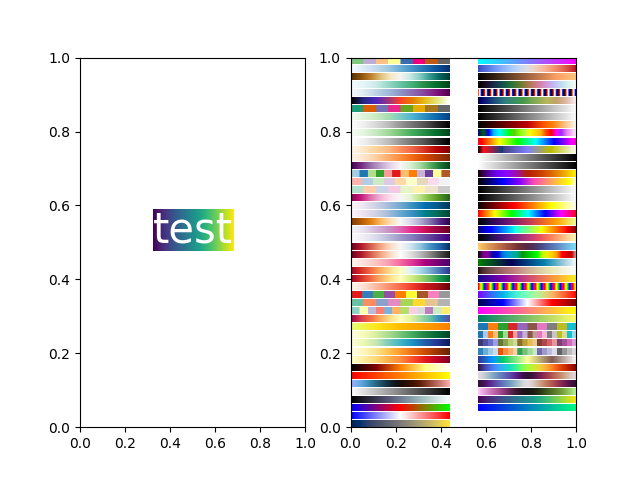
Ein BboxImage kann verwendet werden, um ein Bild gemäß einer Bounding Box zu positionieren. Diese Demo zeigt, wie ein Bild innerhalb der Bounding Box eines text.Text angezeigt wird, sowie wie manuell eine Bounding Box für das Bild erstellt wird.
import matplotlib.pyplot as plt
import numpy as np

from matplotlib.image import BboxImage
from matplotlib.transforms import Bbox, TransformedBbox

fig, (ax1, ax2) = plt.subplots(ncols=2)

# ----------------------------
# Create a BboxImage with Text
# ----------------------------
txt = ax1.text(0.5, 0.5, "test", size=30, ha="center", color="w")
ax1.add_artist(
    BboxImage(txt.get_window_extent, data=np.arange(256).reshape((1, -1))))

# ------------------------------------
# Create a BboxImage for each colormap
# ------------------------------------
# List of all colormaps; skip reversed colormaps.
cmap_names = sorted(m for m in plt.colormaps if not m.endswith("_r"))

ncol = 2
nrow = len(cmap_names) // ncol + 1

xpad_fraction = 0.3
dx = 1 / (ncol + xpad_fraction * (ncol - 1))

ypad_fraction = 0.3
dy = 1 / (nrow + ypad_fraction * (nrow - 1))

for i, cmap_name in enumerate(cmap_names):
    ix, iy = divmod(i, nrow)
    bbox0 = Bbox.from_bounds(ix*dx*(1+xpad_fraction),
                             1 - iy*dy*(1+ypad_fraction) - dy,
                             dx, dy)
    bbox = TransformedBbox(bbox0, ax2.transAxes)
    ax2.add_artist(
        BboxImage(bbox, cmap=cmap_name, data=np.arange(256).reshape((1, -1))))

plt.show()
Referenzen
Die Verwendung der folgenden Funktionen, Methoden, Klassen und Module wird in diesem Beispiel gezeigt
Gesamtlaufzeit des Skripts: (0 Minuten 1,194 Sekunden)