
Hinweis
Zum Ende springen, um den vollständigen Beispielcode herunterzuladen.
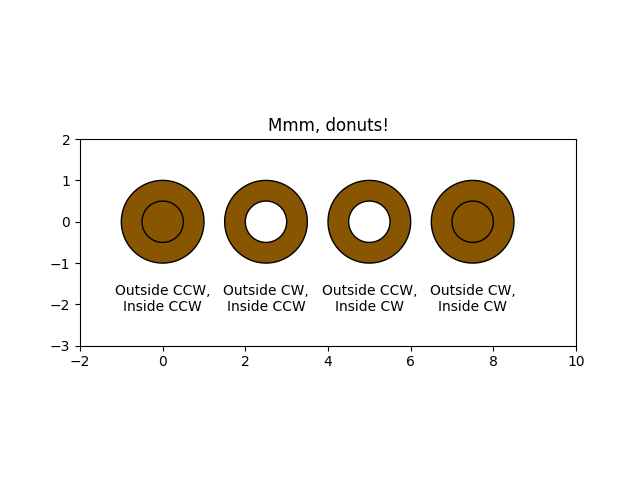
Mmh Donuts!!!#
Zeichnet Donuts (miam!) unter Verwendung von Paths und PathPatches. Dieses Beispiel zeigt den Effekt der Pfadorientierungen in einem zusammengesetzten Pfad.
import matplotlib.pyplot as plt
import numpy as np

import matplotlib.patches as mpatches
import matplotlib.path as mpath


def wise(v):
    if v == 1:
        return "CCW"
    else:
        return "CW"


def make_circle(r):
    t = np.arange(0, np.pi * 2.0, 0.01)
    t = t.reshape((len(t), 1))
    x = r * np.cos(t)
    y = r * np.sin(t)
    return np.hstack((x, y))

Path = mpath.Path

fig, ax = plt.subplots()

inside_vertices = make_circle(0.5)
outside_vertices = make_circle(1.0)
codes = np.ones(
    len(inside_vertices), dtype=mpath.Path.code_type) * mpath.Path.LINETO
codes[0] = mpath.Path.MOVETO

for i, (inside, outside) in enumerate(((1, 1), (1, -1), (-1, 1), (-1, -1))):
    # Concatenate the inside and outside subpaths together, changing their
    # order as needed
    vertices = np.concatenate((outside_vertices[::outside],
                               inside_vertices[::inside]))
    # Shift the path
    vertices[:, 0] += i * 2.5
    # The codes will be all "LINETO" commands, except for "MOVETO"s at the
    # beginning of each subpath
    all_codes = np.concatenate((codes, codes))
    # Create the Path object
    path = mpath.Path(vertices, all_codes)
    # Add plot it
    patch = mpatches.PathPatch(path, facecolor='#885500', edgecolor='black')
    ax.add_patch(patch)

    ax.annotate(f"Outside {wise(outside)},\nInside {wise(inside)}",
                (i * 2.5, -1.5), va="top", ha="center")

ax.set_xlim(-2, 10)
ax.set_ylim(-3, 2)
ax.set_title('Mmm, donuts!')
ax.set_aspect(1.0)
plt.show()
Referenzen
Die Verwendung der folgenden Funktionen, Methoden, Klassen und Module wird in diesem Beispiel gezeigt