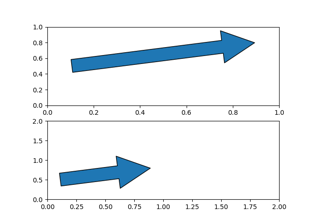
matplotlib.patches.FancyArrow#
- class matplotlib.patches.FancyArrow(x, y, dx, dy, *, width=0.001, length_includes_head=False, head_width=None, head_length=None, shape='full', overhang=0, head_starts_at_zero=False, **kwargs)[Quelle]#
Bases:
PolygonÄhnlich wie Arrow, aber ermöglicht die unabhängige Einstellung von Kopfbreite und Kopfhöhe.
- Parameter:
- x, yfloat
Die x- und y-Koordinaten der Pfeilbasis.
- dx, dyfloat
Die Länge des Pfeils in x- und y-Richtung.
- widthfloat, Standard: 0.001
Breite des gesamten Pfeilschafts.
- length_includes_headbool, Standard: False
True, wenn die Spitze bei der Längenberechnung berücksichtigt werden soll.
- head_widthfloat oder None, Standard: 3*width
Gesamtbreite der vollen Pfeilspitze.
- head_lengthfloat oder None, Standard: 1.5*head_width
Länge der Pfeilspitze.
- shape{'full', 'left', 'right'}, Standard: 'full'
Zeichne die linke Hälfte, die rechte Hälfte oder den gesamten Pfeil.
- overhangfloat, Standard: 0
Anteil, um den der Pfeil nach hinten gezogen wird (0 Überhang bedeutet dreieckige Form). Kann negativ oder größer als eins sein.
- head_starts_at_zerobool, Standard: False
Wenn True, beginnt die Spitze bei Koordinate 0 zu zeichnen, anstatt bei Koordinate 0 zu enden.
- **kwargs
Patch-EigenschaftenEigenschaft
Beschreibung
eine Filterfunktion, die ein (m, n, 3) Float-Array und einen dpi-Wert entgegennimmt und ein (m, n, 3) Array und zwei Offsets von der linken unteren Ecke des Bildes zurückgibt
unknown
bool
antialiasedoderaabool oder None
CapStyleoder {'butt', 'projecting', 'round'}BboxBaseoder Nonebool
Patch oder (Path, Transform) oder None
Farbe oder None
Farbe oder None
bool
str
{'/', '\', '|', '-', '+', 'x', 'o', 'O', '.', '*'}
unknown
bool
JoinStyleoder {'miter', 'round', 'bevel'}object
{'-', '--', '-.', ':', '', (offset, on-off-seq), ...}
float oder None
bool
Liste von
AbstractPathEffectNone oder bool oder float oder callable
bool
(scale: float, length: float, randomness: float)
bool oder None
str
bool
float
- set(*, agg_filter=<UNSET>, alpha=<UNSET>, animated=<UNSET>, antialiased=<UNSET>, capstyle=<UNSET>, clip_box=<UNSET>, clip_on=<UNSET>, clip_path=<UNSET>, closed=<UNSET>, color=<UNSET>, data=<UNSET>, edgecolor=<UNSET>, facecolor=<UNSET>, fill=<UNSET>, gid=<UNSET>, hatch=<UNSET>, hatch_linewidth=<UNSET>, in_layout=<UNSET>, joinstyle=<UNSET>, label=<UNSET>, linestyle=<UNSET>, linewidth=<UNSET>, mouseover=<UNSET>, path_effects=<UNSET>, picker=<UNSET>, rasterized=<UNSET>, sketch_params=<UNSET>, snap=<UNSET>, transform=<UNSET>, url=<UNSET>, visible=<UNSET>, xy=<UNSET>, zorder=<UNSET>)[Quelle]#
Setzt mehrere Eigenschaften auf einmal.
Unterstützte Eigenschaften sind
Eigenschaft
Beschreibung
eine Filterfunktion, die ein (m, n, 3) Float-Array und einen dpi-Wert entgegennimmt und ein (m, n, 3) Array und zwei Offsets von der linken unteren Ecke des Bildes zurückgibt
float oder None
bool
antialiasedoderaabool oder None
CapStyleoder {'butt', 'projecting', 'round'}BboxBaseoder Nonebool
Patch oder (Path, Transform) oder None
bool
unknown
Farbe oder None
Farbe oder None
bool
str
{'/', '\', '|', '-', '+', 'x', 'o', 'O', '.', '*'}
unknown
bool
JoinStyleoder {'miter', 'round', 'bevel'}object
{'-', '--', '-.', ':', '', (offset, on-off-seq), ...}
float oder None
bool
Liste von
AbstractPathEffectNone oder bool oder float oder callable
bool
(scale: float, length: float, randomness: float)
bool oder None
str
bool
(N, 2) array-ähnlich
float
- set_data(*, x=None, y=None, dx=None, dy=None, width=None, head_width=None, head_length=None)[Quelle]#
Setzt die x, y, dx, dy, width, head_with und head_length von
FancyArrow. Werte, die auf None belassen werden, werden nicht aktualisiert.- Parameter:
- x, yfloat oder None, Standard: None
Die x- und y-Koordinaten der Pfeilbasis.
- dx, dyfloat oder None, Standard: None
Die Länge des Pfeils in x- und y-Richtung.
- widthfloat oder None, Standard: None
Breite des gesamten Pfeilschafts.
- head_widthfloat oder None, Standard: None
Gesamtbreite der vollen Pfeilspitze.
- head_lengthfloat oder None, Standard: None
Länge der Pfeilspitze.